
Review, Evaluation & Redesign
Review, Evaluation & Redesign
Review, Evaluation & Redesign
Overview
Overview
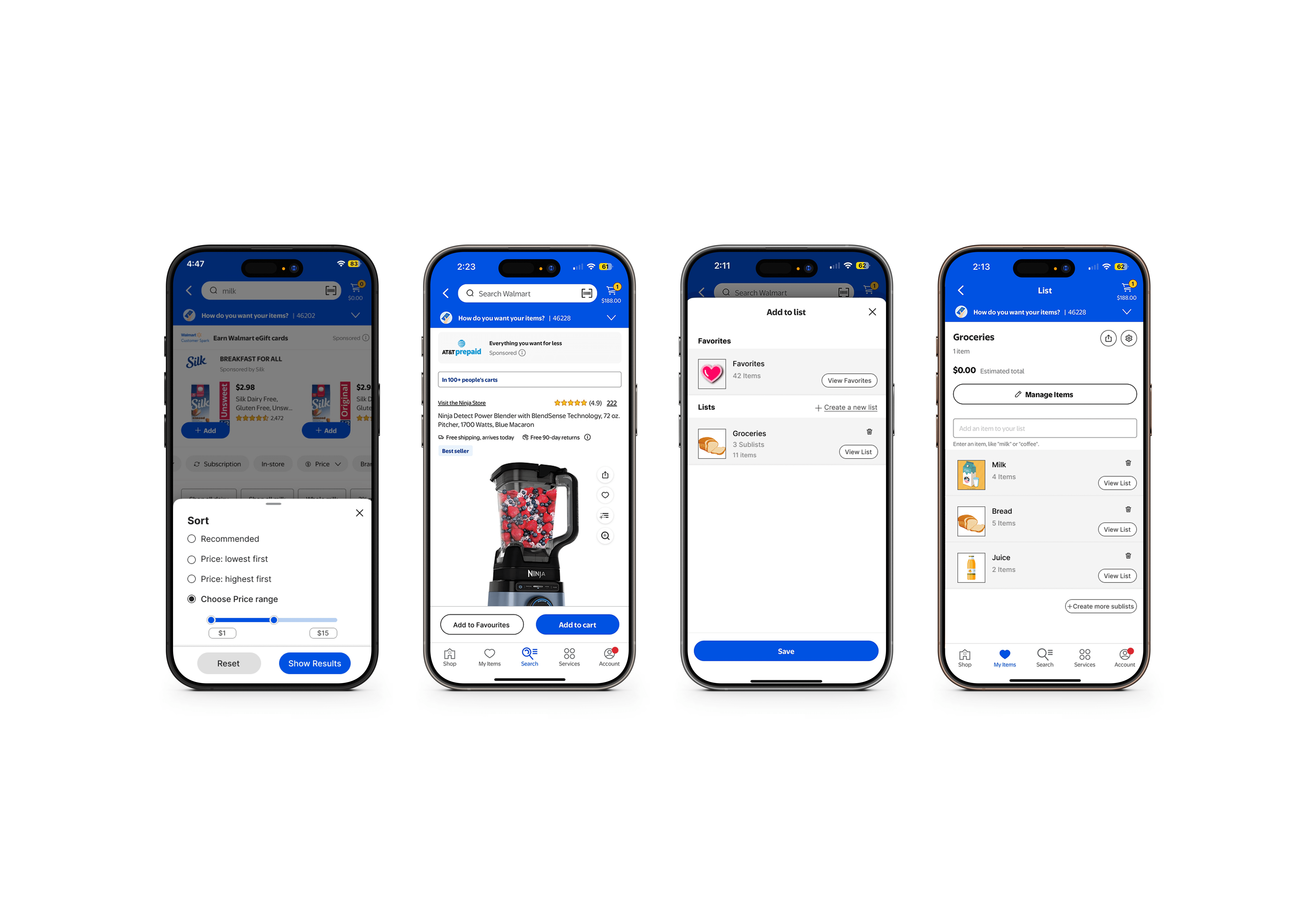
Walmart is one of the world’s largest retailers, offering an expansive inventory across groceries, electronics, and home goods. However, the Walmart app faces several usability challenges that impact user satisfaction & shopping efficiency. This project evaluates those challenges and presents a redesign aimed at simplifying the user journey, increasing task success rates, and reducing frustration.
Timeline: Oct-Dec 2023
Timeline: Oct-Dec 2023
Role: User Research, UX Evaluation, Prototyping, Usability Testing
Role: User Research, UX Evaluation, Prototyping, Usability Testing
Use Case: E-commerce Usability
Use Case: E-commerce Usability
Defining Product Vision
Defining Product Vision
The Challenge
The Challenge
The Challenge
The goal was to evaluate the usability of the Walmart app and identify friction points in key user flows particularly around search, list creation, cart management, and checkout. Our findings revealed usability breakdowns that hindered user efficiency and confidence during online shopping.
The goal was to evaluate the usability of the Walmart app and identify friction points in key user flows particularly around search, list creation, cart management, and checkout. Our findings revealed usability breakdowns that hindered user efficiency and confidence during online shopping.
The goal was to evaluate the usability of the Walmart app and identify friction points in key user flows particularly around search, list creation, cart management, and checkout. Our findings revealed usability breakdowns that hindered user efficiency and confidence during online shopping.
KPIs + Potential Impact
KPIs + Potential Impact
KPIs + Potential Impact
SUS Score Improvement
SUS Score Improvement
From 49.68 ("F") to a projected 85+ through iterative design.
From 49.68 ("F") to a projected 85+ through iterative design.
Task Completion Rates
Task Completion Rates
Increase in successful task completion during user tests post-redesign.
Increase in successful task completion during user tests post-redesign.
Reduced Confusion
Reduced Confusion
Clearer UI and information architecture leading to reduced user errors.
Clearer UI and information architecture leading to reduced user errors.
Improved User Feedback
Improved User Feedback
Enhanced in-app notifications improving perceived usability.
Enhanced in-app notifications improving perceived usability.
User Research
User Research
Research Methods
Research Methods
Research Methods
User Interviews
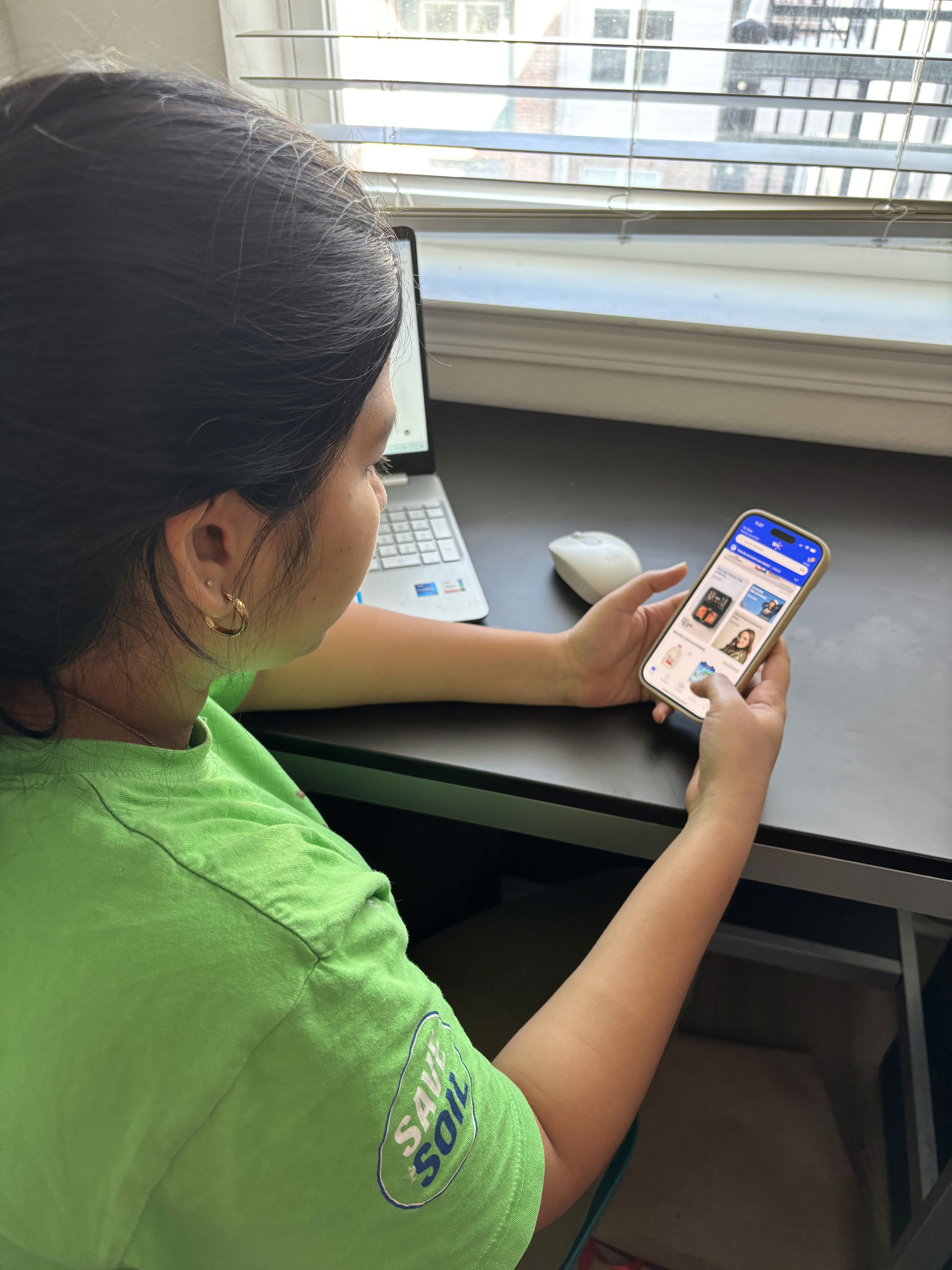
We conducted 8 semi-structured interviews with frequent Walmart app users to understand their shopping habits, goals, and pain points. These conversations revealed recurring frustrations with list creation, filtering tools, and cart interactions, guiding our early design direction.
User Interviews
We conducted 8 semi-structured interviews with frequent Walmart app users to understand their shopping habits, goals, and pain points. These conversations revealed recurring frustrations with list creation, filtering tools, and cart interactions, guiding our early design direction.
User Interviews
We conducted 8 semi-structured interviews with frequent Walmart app users to understand their shopping habits, goals, and pain points. These conversations revealed recurring frustrations with list creation, filtering tools, and cart interactions, guiding our early design direction.
Think-Aloud Usability Testing
Participants were asked to complete common tasks like filtering products or adding items to a list while narrating their thought process. This method uncovered moments of hesitation, confusion in navigation, and unexpected friction points that weren’t visible in interviews alone.
Think-Aloud Usability Testing
Participants were asked to complete common tasks like filtering products or adding items to a list while narrating their thought process. This method uncovered moments of hesitation, confusion in navigation, and unexpected friction points that weren’t visible in interviews alone.
Think-Aloud Usability Testing
Participants were asked to complete common tasks like filtering products or adding items to a list while narrating their thought process. This method uncovered moments of hesitation, confusion in navigation, and unexpected friction points that weren’t visible in interviews alone.
System Usability Scale (SUS)
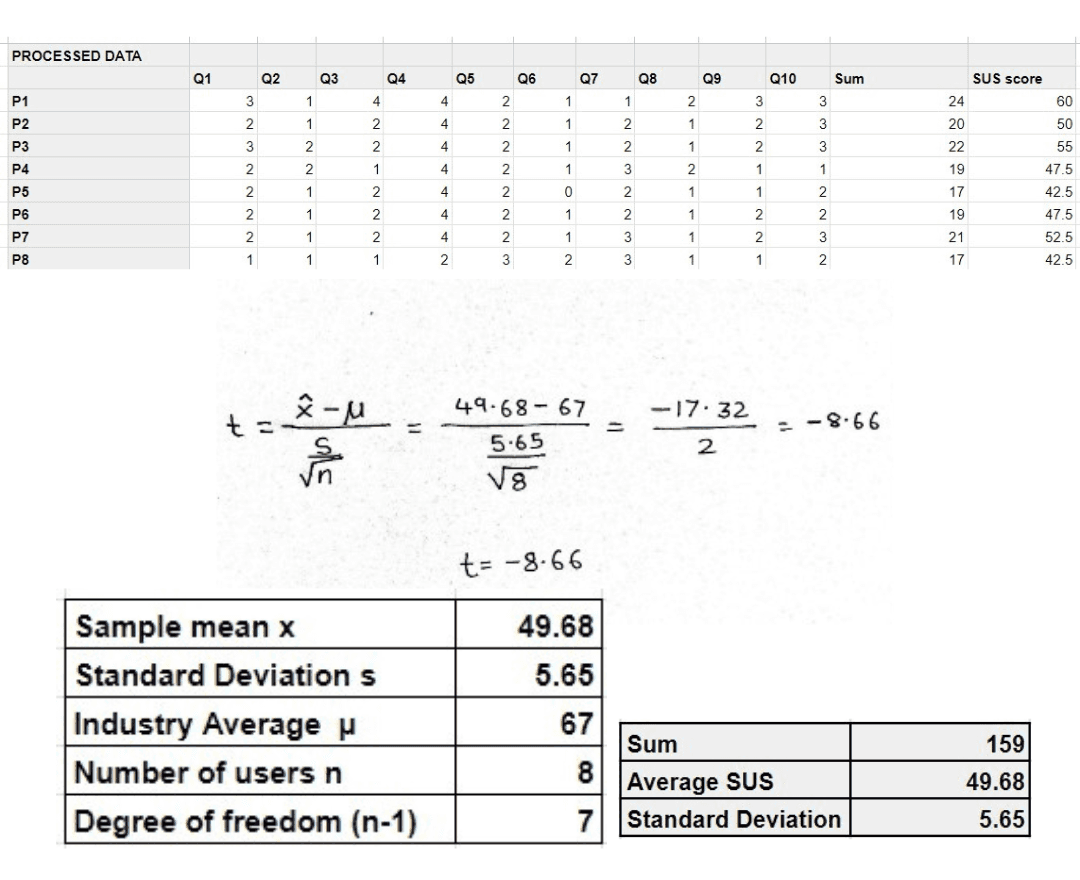
After usability testing, we administered the SUS to evaluate the app’s overall usability. The app scored 49.68 out of 100, which falls below average and highlighted significant usability concerns that informed our redesign goals.
System Usability Scale (SUS)
After usability testing, we administered the SUS to evaluate the app’s overall usability. The app scored 49.68 out of 100, which falls below average and highlighted significant usability concerns that informed our redesign goals.
System Usability Scale (SUS)
After usability testing, we administered the SUS to evaluate the app’s overall usability. The app scored 49.68 out of 100, which falls below average and highlighted significant usability concerns that informed our redesign goals.
Competitive Analysis
We analyzed apps from competitors such as Amazon, Target, and Instacart to benchmark successful patterns in e-commerce UX. Key takeaways included streamlined list management, intuitive filtering systems, and stronger in-app feedback loops.
Competitive Analysis
We analyzed apps from competitors such as Amazon, Target, and Instacart to benchmark successful patterns in e-commerce UX. Key takeaways included streamlined list management, intuitive filtering systems, and stronger in-app feedback loops.
Competitive Analysis
We analyzed apps from competitors such as Amazon, Target, and Instacart to benchmark successful patterns in e-commerce UX. Key takeaways included streamlined list management, intuitive filtering systems, and stronger in-app feedback loops.
Affinity Mapping
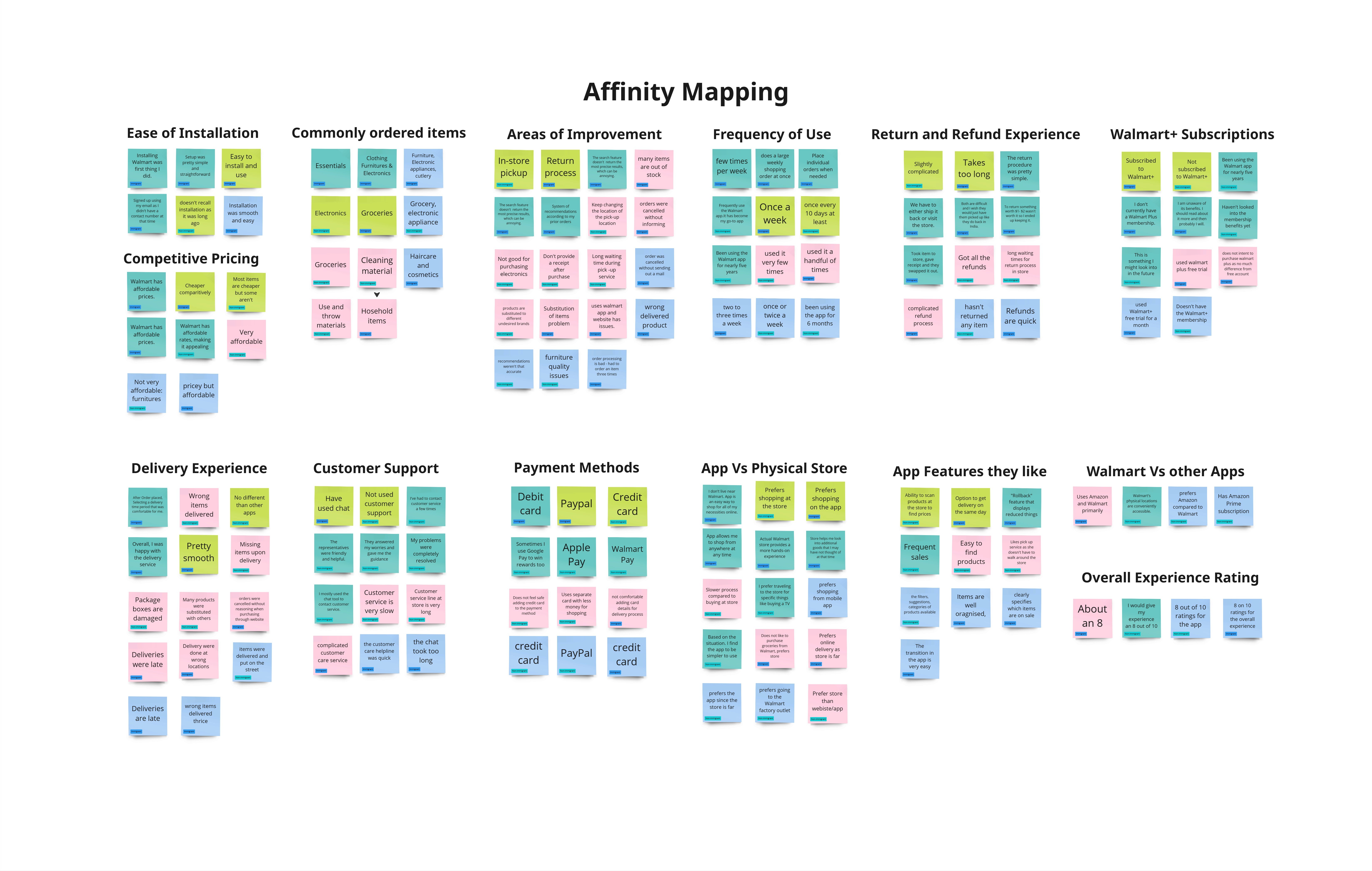
To synthesize findings from interviews and testing, we used affinity mapping to group similar observations. This method helped us identify major usability themes and prioritize areas for improvement based on user frustrations and behavior patterns.
Affinity Mapping
To synthesize findings from interviews and testing, we used affinity mapping to group similar observations. This method helped us identify major usability themes and prioritize areas for improvement based on user frustrations and behavior patterns.
Affinity Mapping
To synthesize findings from interviews and testing, we used affinity mapping to group similar observations. This method helped us identify major usability themes and prioritize areas for improvement based on user frustrations and behavior patterns.
Persona Development
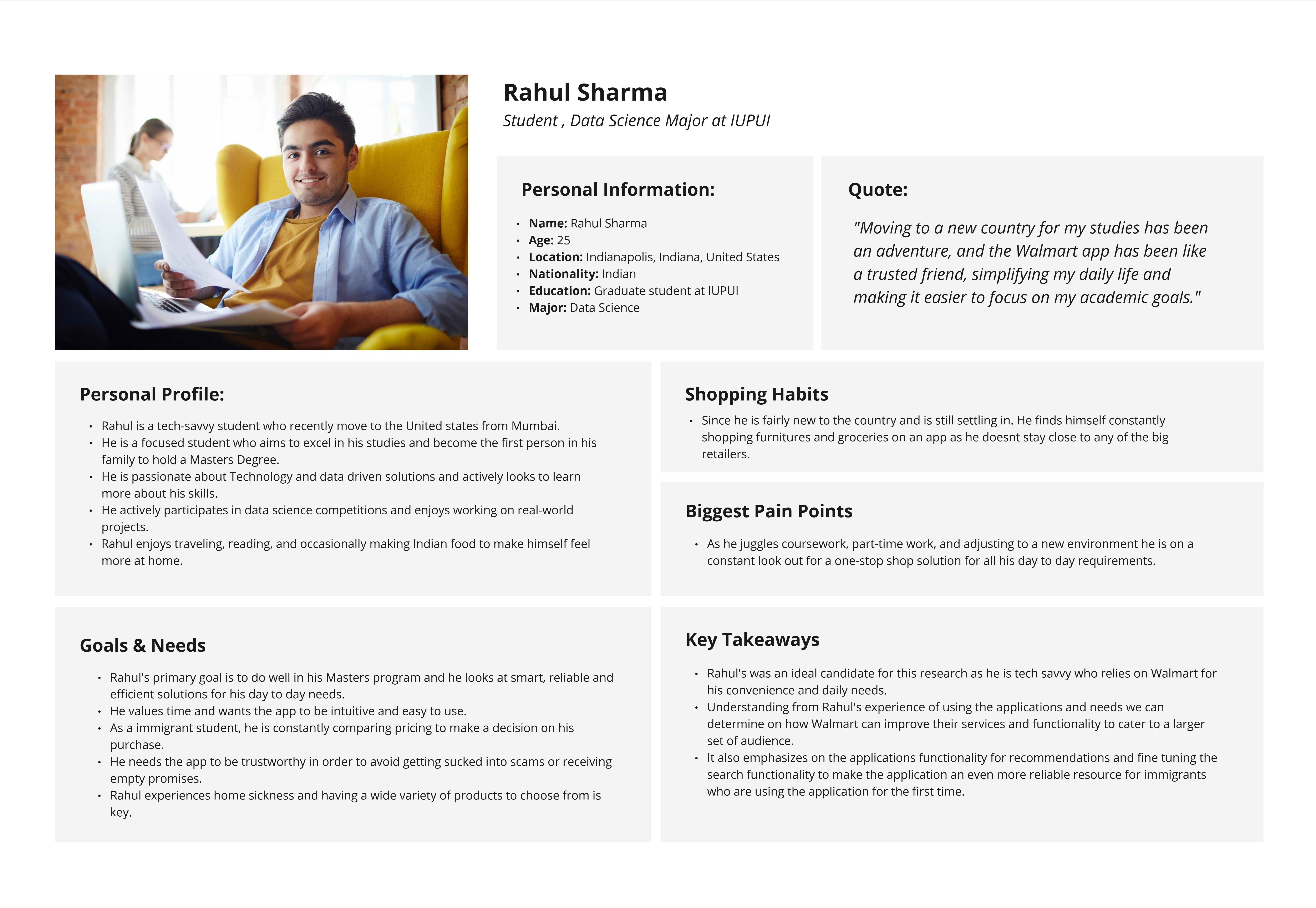
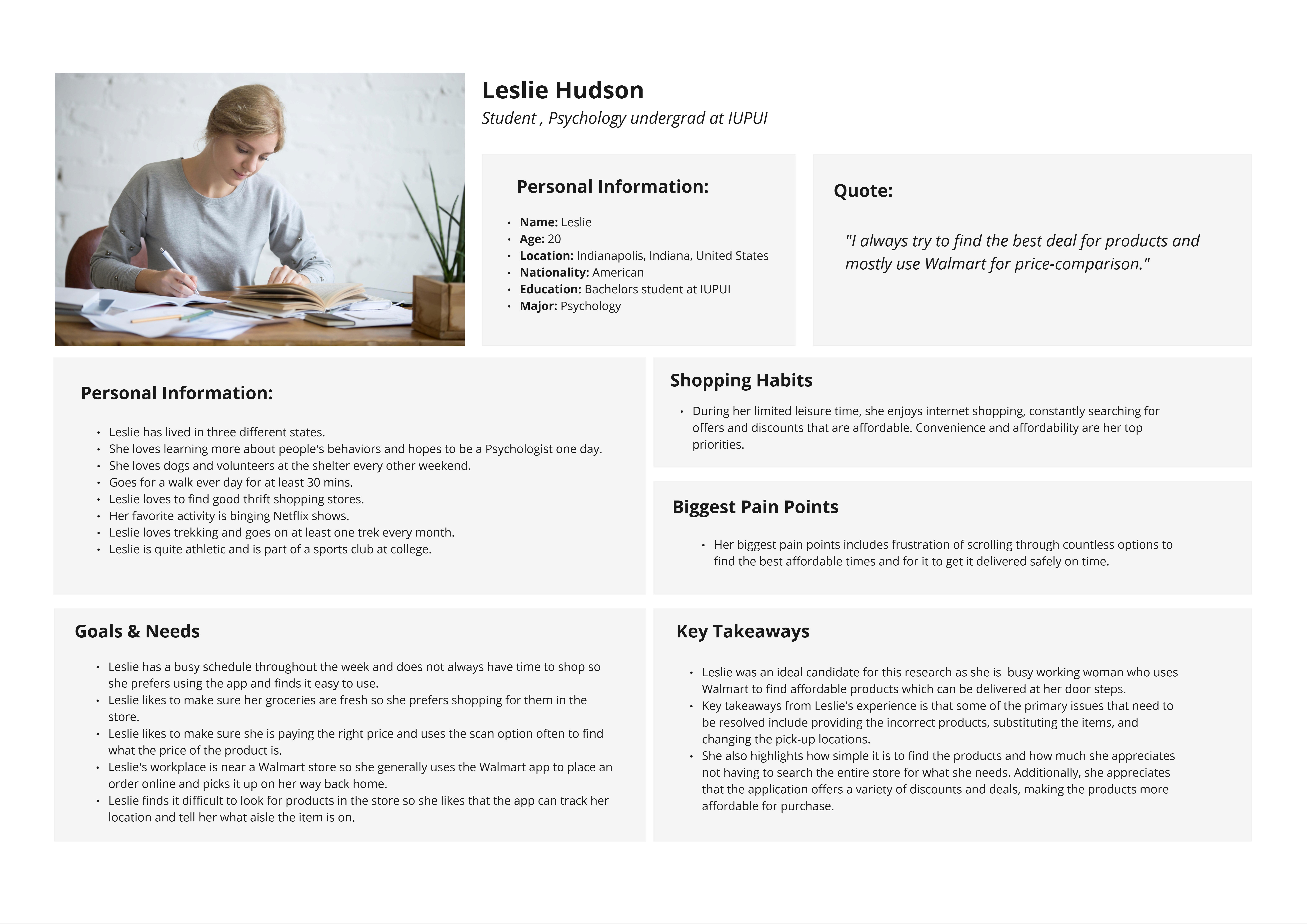
We created user personas that captured the goals, motivations, and struggles of two primary user types: the efficient planner and the casual browser. These personas grounded our design decisions in real user perspectives and helped us maintain empathy throughout the redesign process.
Persona Development
We created user personas that captured the goals, motivations, and struggles of two primary user types: the efficient planner and the casual browser. These personas grounded our design decisions in real user perspectives and helped us maintain empathy throughout the redesign process.
Persona Development
We created user personas that captured the goals, motivations, and struggles of two primary user types: the efficient planner and the casual browser. These personas grounded our design decisions in real user perspectives and helped us maintain empathy throughout the redesign process.

Research Insights
Research Insights
User Research & Insights
User Research & Insights
User Research & Insights
To uncover usability challenges and improvement opportunities within the Walmart app, we conducted think-aloud usability testing sessions and semi-structured interviews with a diverse group of 8+ participants. These sessions provided firsthand insight into how users interact with key features like list creation, filtering tools, cart navigation, and onboarding. Through these observations, we identified recurring pain points and unmet needs that guided our redesign priorities. The following summarizes the key user frustrations and expectations that emerged from our research.
To uncover usability challenges and improvement opportunities within the Walmart app, we conducted think-aloud usability testing sessions and semi-structured interviews with a diverse group of 8+ participants. These sessions provided firsthand insight into how users interact with key features like list creation, filtering tools, cart navigation, and onboarding. Through these observations, we identified recurring pain points and unmet needs that guided our redesign priorities. The following summarizes the key user frustrations and expectations that emerged from our research.
To uncover usability challenges and improvement opportunities within the Walmart app, we conducted think-aloud usability testing sessions and semi-structured interviews with a diverse group of 8+ participants. These sessions provided firsthand insight into how users interact with key features like list creation, filtering tools, cart navigation, and onboarding. Through these observations, we identified recurring pain points and unmet needs that guided our redesign priorities. The following summarizes the key user frustrations and expectations that emerged from our research.
01
Pain Points
Confusing List Creation: Users were unsure how to create and manage lists.
Unclear Price Filtering: Filtering tools were split in two places, leading to frustration.
Cumbersome Navigation: Adding/viewing items in the cart required too many steps.
Lack of Instant Feedback: Actions like adding items didn’t provide clear confirmation.
Limited Onboarding: New users felt lost and unsupported by the interface.
01
Pain Points
Confusing List Creation: Users were unsure how to create and manage lists.
Unclear Price Filtering: Filtering tools were split in two places, leading to frustration.
Cumbersome Navigation: Adding/viewing items in the cart required too many steps.
Lack of Instant Feedback: Actions like adding items didn’t provide clear confirmation.
Limited Onboarding: New users felt lost and unsupported by the interface.
01
Pain Points
Confusing List Creation: Users were unsure how to create and manage lists.
Unclear Price Filtering: Filtering tools were split in two places, leading to frustration.
Cumbersome Navigation: Adding/viewing items in the cart required too many steps.
Lack of Instant Feedback: Actions like adding items didn’t provide clear confirmation.
Limited Onboarding: New users felt lost and unsupported by the interface.
02
User Needs
Simplified List Creation: A clear, intuitive way to create, organize, and manage shopping lists.
Unified Filtering Experience: A centralized, easy-to-access filtering tool to streamline product discovery.
Efficient Navigation Flow: Smooth transitions between shopping, list management, and cart viewing.
Immediate Feedback on Actions: Visual or haptic cues confirming successful interactions, like adding items.
Guided Onboarding Experience: Helpful prompts or tutorials to support first-time users & reduce learning time.
02
User Needs
Simplified List Creation: A clear, intuitive way to create, organize, and manage shopping lists.
Unified Filtering Experience: A centralized, easy-to-access filtering tool to streamline product discovery.
Efficient Navigation Flow: Smooth transitions between shopping, list management, and cart viewing.
Immediate Feedback on Actions: Visual or haptic cues confirming successful interactions, like adding items.
Guided Onboarding Experience: Helpful prompts or tutorials to support first-time users & reduce learning time.
02
User Needs
Simplified List Creation: A clear, intuitive way to create, organize, and manage shopping lists.
Unified Filtering Experience: A centralized, easy-to-access filtering tool to streamline product discovery.
Efficient Navigation Flow: Smooth transitions between shopping, list management, and cart viewing.
Immediate Feedback on Actions: Visual or haptic cues confirming successful interactions, like adding items.
Guided Onboarding Experience: Helpful prompts or tutorials to support first-time users & reduce learning time.
Design and Prototyping
Design and Prototyping
Prototyping & Iteration
Prototyping & Iteration
Prototyping & Iteration
Mid-Fi Prototypes
Since we were redesigning an existing product, we began by creating mid-fidelity prototypes focused on refining key pain points such as list creation, price filtering, and cart navigation. These prototypes helped us test alternate layouts, streamline interactions, and validate ideas before investing in visual polish.
Mid-Fi Prototypes
Since we were redesigning an existing product, we began by creating mid-fidelity prototypes focused on refining key pain points such as list creation, price filtering, and cart navigation. These prototypes helped us test alternate layouts, streamline interactions, and validate ideas before investing in visual polish.
Mid-Fi Prototypes
Since we were redesigning an existing product, we began by creating mid-fidelity prototypes focused on refining key pain points such as list creation, price filtering, and cart navigation. These prototypes helped us test alternate layouts, streamline interactions, and validate ideas before investing in visual polish.
High-Fi Designs
Based on usability testing insights, we developed high-fidelity mockups with updated visual elements, clear feedback cues, and simplified workflows. These final designs aimed to reduce cognitive load and align more closely with user expectations, while staying consistent with Walmart’s brand guidelines.
High-Fi Designs
Based on usability testing insights, we developed high-fidelity mockups with updated visual elements, clear feedback cues, and simplified workflows. These final designs aimed to reduce cognitive load and align more closely with user expectations, while staying consistent with Walmart’s brand guidelines.
High-Fi Designs
Based on usability testing insights, we developed high-fidelity mockups with updated visual elements, clear feedback cues, and simplified workflows. These final designs aimed to reduce cognitive load and align more closely with user expectations, while staying consistent with Walmart’s brand guidelines.
Solution Overview
Solution Overview
Sorting by Price?
Now it makes sense!
Sorting by Price?
Now it makes sense!
Sorting by Price?
Now it makes sense!
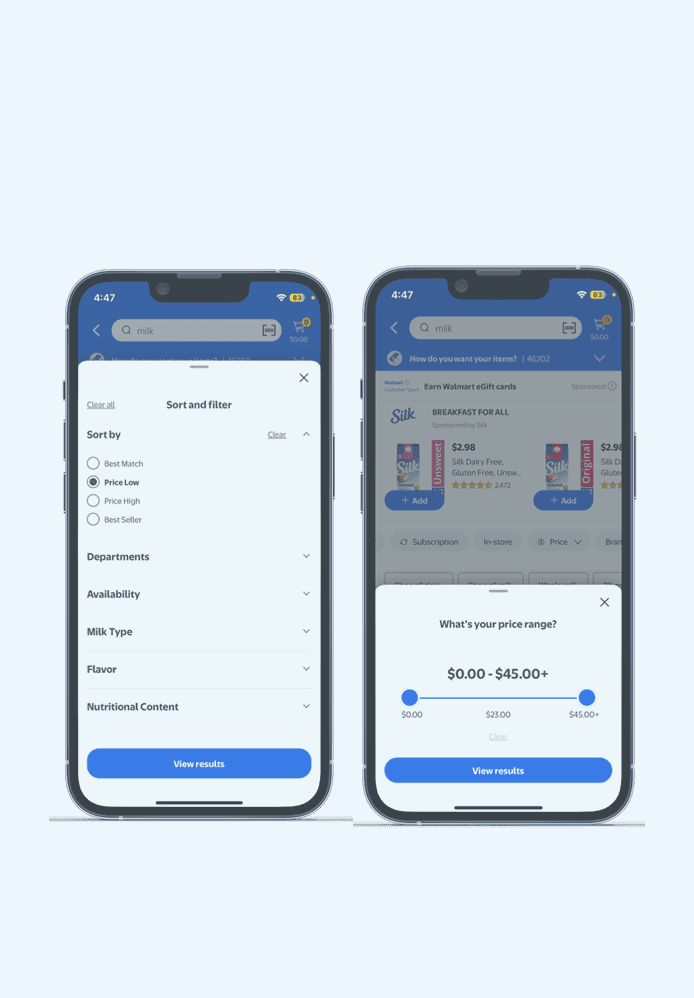
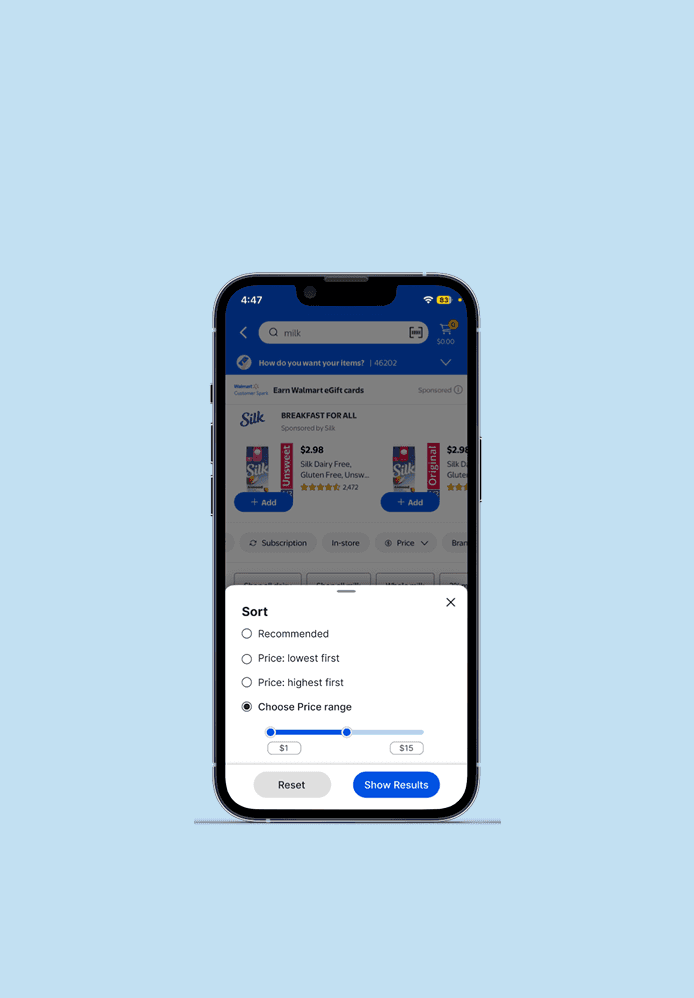
Users instinctively checked "Sort & Filter" for price range, but couldn’t find it. Turns out, Walmart had two separate price filters. We fixed that. Now, one clear price filter lives where users expect it. The result? No confusion. Faster filtering. Smarter shopping.
Before
Before
Before
After
After
After
Impact
One price filter.
Zero confusion.
Now, sorting just works.
Impact
One price filter.
Zero confusion.
Now, sorting just works.
Wishlists vs. Lists?
No More Guessing!
Wishlists vs. Lists?
No More Guessing!
Wishlists vs. Lists?
No More Guessing!
Users thought wishlists and lists were the same because Walmart made it confusing. We fixed that. "Wishlist" is now "Favorites" and sits clearly at the top. Below, lists now show sublists and item counts at a glance. The result? Zero confusion. Smooth navigation. Happy shoppers.
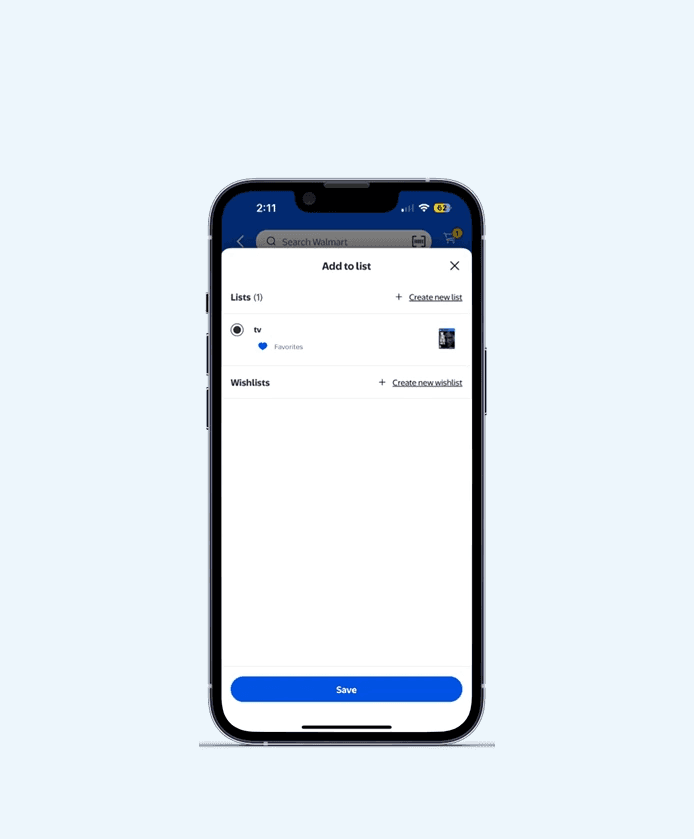
Before
Before
Before
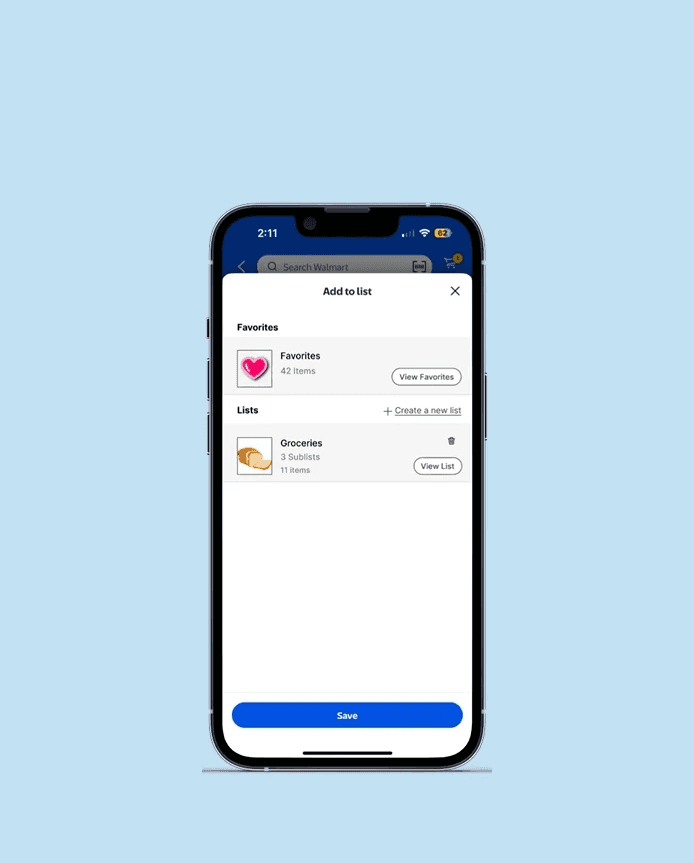
After
After
After
Impact
Users got it instantly.
No head-scratching.
Just smooth, effortless
shopping.
Impact
One price filter.
Zero confusion.
Now, sorting just works.
From Confusion to Clarity: Simplifying Walmart’s Lists & Sublists
Users struggled to navigate Walmart’s lists and sublists, with many abandoning the feature due to its complexity. Our redesign streamlined the experience, making it intuitive and effortless. The result? A 100% success rate in usability tests, every participant easily created and managed sublists.
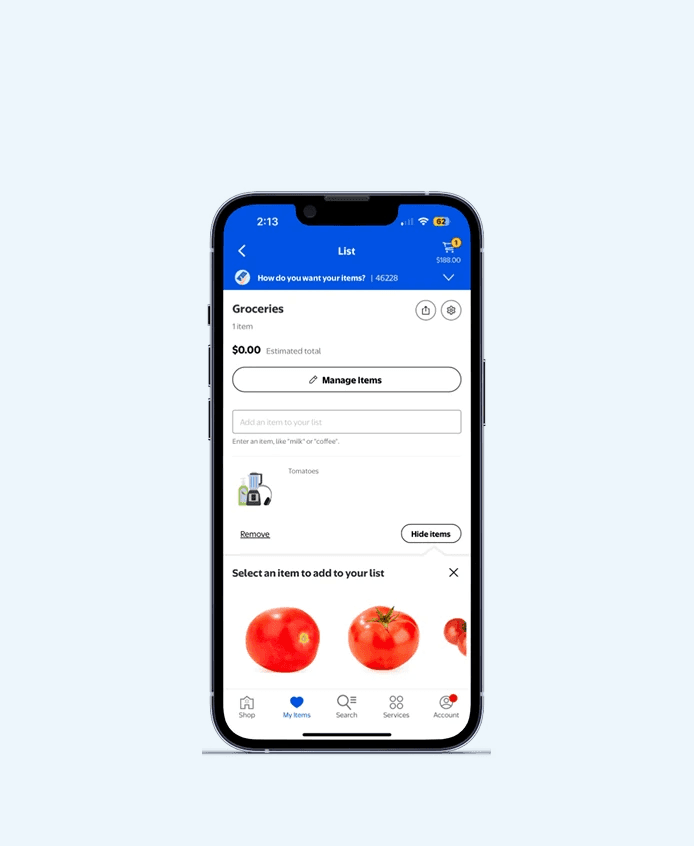
Before
Before
Before
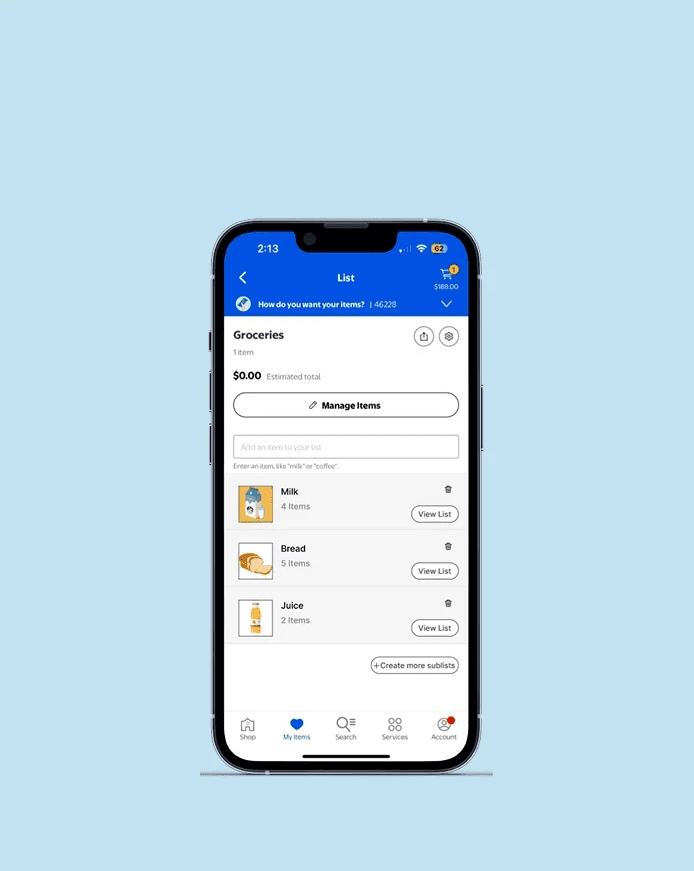
After
After
After
Impact
100% success.
Zero frustration.
Now, lists just click.
Impact
One price filter.
Zero confusion.
Now, sorting just works.
Adding to Lists?
No More Scrolling!
Users struggled to find the "Add to List" button, buried in the product page. Worse, the heart icon next to it caused even more confusion. We fixed that. Now, two clear icons sit right next to the product image, a heart for Favorites and a plus-list icon for Lists. The result? No more scrolling. No more guessing. Just quick, easy saving.
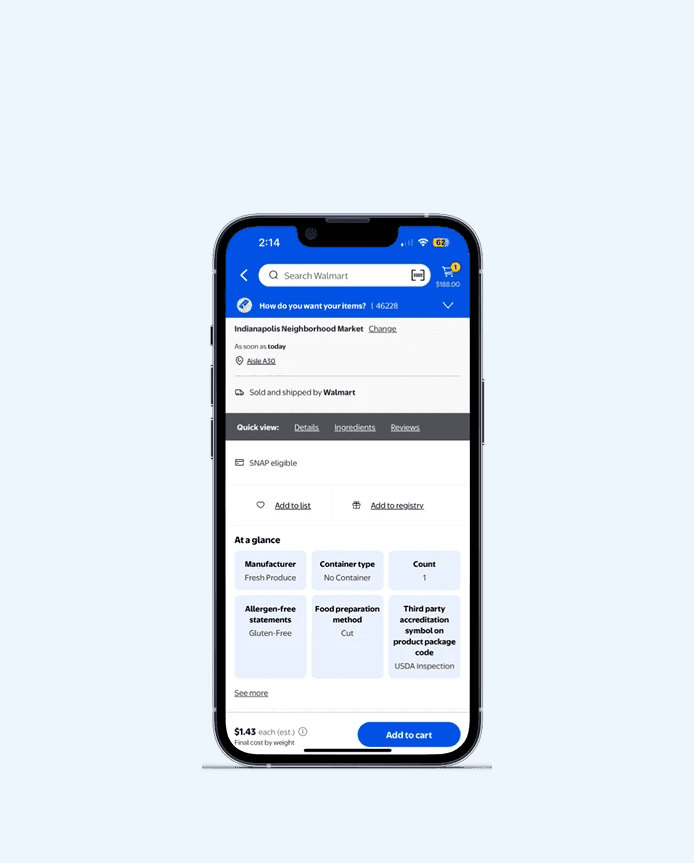
Before
Before
Before
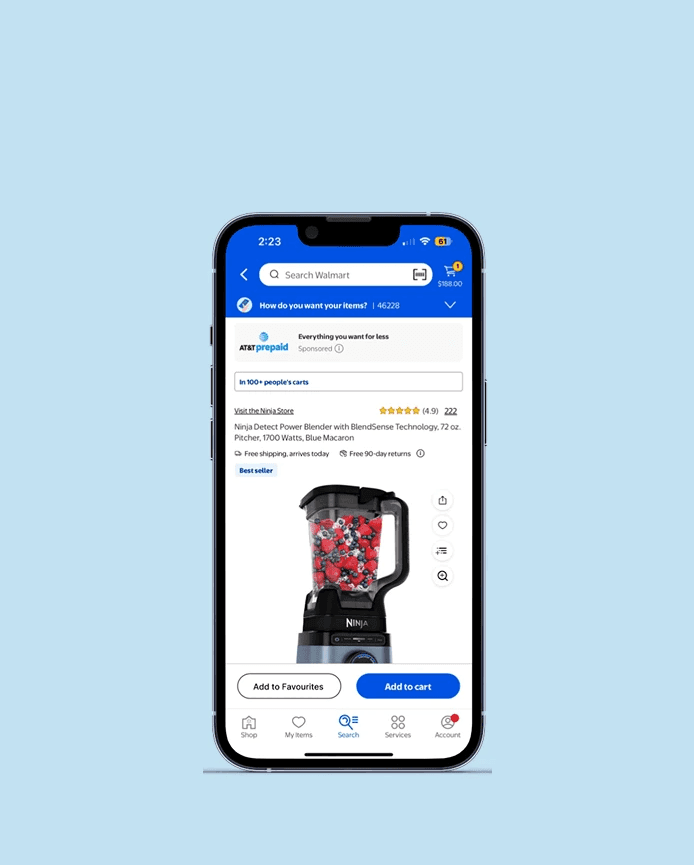
After
After
After
Impact
Users found it instantly.
No scrolling, no confusion.
Just quick, easy saving.
Impact
One price filter.
Zero confusion.
Now, sorting just works.
User Testing & Feature Validation
User Testing & Feature Validation
Understanding What Worked
Understanding What Worked
Understanding What Worked
Users tested the prototypes of the redesigned app. Testing revealed:
Users tested the prototypes of the redesigned app. Testing revealed:
Users tested the prototypes of the redesigned app. Testing revealed:
Improved task success rates (especially for list creation and filtering)
Increased satisfaction with cart and list features
Fewer navigation errors and moments of hesitation
Improved task success rates (especially for list creation and filtering)
Increased satisfaction with cart and list features
Fewer navigation errors and moments of hesitation
Outcomes and Learnings
Outcomes and Learnings
Reflection & Key learnings
Reflection & Key learnings
Reflection & Key learnings
Testing Reveals the Unexpected
Think-aloud usability sessions challenged many of our assumptions about how users would navigate the app. Observing participants in real time highlighted moments of hesitation and confusion that weren't obvious during design, reinforcing the importance of early and frequent testing.
Testing Reveals the Unexpected
Think-aloud usability sessions challenged many of our assumptions about how users would navigate the app. Observing participants in real time highlighted moments of hesitation and confusion that weren't obvious during design, reinforcing the importance of early and frequent testing.
Testing Reveals the Unexpected
Think-aloud usability sessions challenged many of our assumptions about how users would navigate the app. Observing participants in real time highlighted moments of hesitation and confusion that weren't obvious during design, reinforcing the importance of early and frequent testing.
Small Tweaks, Major Impact
Minor adjustments like renaming unclear labels, repositioning icons, or improving contrast had a surprising effect on usability. These small changes helped reduce cognitive load and made core tasks feel smoother and more intuitive.
Small Tweaks, Major Impact
Minor adjustments like renaming unclear labels, repositioning icons, or improving contrast had a surprising effect on usability. These small changes helped reduce cognitive load and made core tasks feel smoother and more intuitive.
Small Tweaks, Major Impact
Minor adjustments like renaming unclear labels, repositioning icons, or improving contrast had a surprising effect on usability. These small changes helped reduce cognitive load and made core tasks feel smoother and more intuitive.
Onboarding Can’t Be an Afterthought
Even a simple onboarding experience helped users understand key features more quickly. We realized that contextual hints and short walkthroughs dramatically improved engagement, especially for first-time users navigating complex flows.
Onboarding Can’t Be an Afterthought
Even a simple onboarding experience helped users understand key features more quickly. We realized that contextual hints and short walkthroughs dramatically improved engagement, especially for first-time users navigating complex flows.
Onboarding Can’t Be an Afterthought
Even a simple onboarding experience helped users understand key features more quickly. We realized that contextual hints and short walkthroughs dramatically improved engagement, especially for first-time users navigating complex flows.
Iterative Design Drives Usability
Through repeated feedback loops, we refined our designs to better match real user behaviors and needs. Every cycle of prototyping and testing brought more clarity and confidence to the user experience, proving that iteration is essential to building effective, user-centered solutions.
Iterative Design Drives Usability
Through repeated feedback loops, we refined our designs to better match real user behaviors and needs. Every cycle of prototyping and testing brought more clarity and confidence to the user experience, proving that iteration is essential to building effective, user-centered solutions.
Iterative Design Drives Usability
Through repeated feedback loops, we refined our designs to better match real user behaviors and needs. Every cycle of prototyping and testing brought more clarity and confidence to the user experience, proving that iteration is essential to building effective, user-centered solutions.
Conclusion
Conclusion
Final Thoughts
Final Thoughts
Final Thoughts
This case study reaffirmed the value of user-centered design in enhancing digital experiences, even within well-established platforms like the Walmart app. By closely observing real users, we identified subtle but impactful areas of friction that affected the overall shopping experience. Through iterative prototyping and usability testing, we crafted design solutions that prioritized clarity, efficiency, and ease of use. Ultimately, this project demonstrated that small design decisions, when informed by real user needs can lead to meaningful improvements in engagement and satisfaction.